May 23, 2013

How to use the Eclipse IDE in Windows with Arduino

If you're working with multiple development platforms and environments, it can help to use the same IDE to reduce the number of systems to learn and generally keep your sanity. Or you may just not like the Arduino IDE - so in either case an interesting option is to use the open-source Eclipse development tool. Modifying Eclipse to deal with Arduino via AVR-GCC and the SDK can be a difficult path, however the people from the University of Central Arkansas (in the USA) have written a detailed step-by-step tutorial on making it happen. 


So if you're interested in upgrading your IDE to Eclipse, click here. And for more, we're on twitter and Google+, so follow us for news and product updates as well. 

If you're new to Arduino, the first step is a solid board for your projects - our Freetronics Eleven - the Arduino-Uno compatible with low-profile USB socket, onboard prototyping space and easy to view LEDs:


May 23, 2013

Automated Arduino-powered cat feeder system

 Arduino enthusiast and cat owner Nicolas Mop has created an well-built automated cat food dispenser based around an Arduino system. Using a real-time clock the feeder can be programmed to dispense fixed amounts of dry cat food over required intervals, and has a neat user-interface via an LCD and the serial monitor. The physical hardware is also quite interesting - Nicolas used an "Archimedes screw" to move the cat food from the hopper and across to holes which then allow it to fall into the bowls, for example:


It might be a good idea to use a larger bowl if your cat is picky about where it eats from. However it's a great project, and you can find all the details on the project page. And for more, we're on twitter and Google+, so follow us for news and product updates as well.

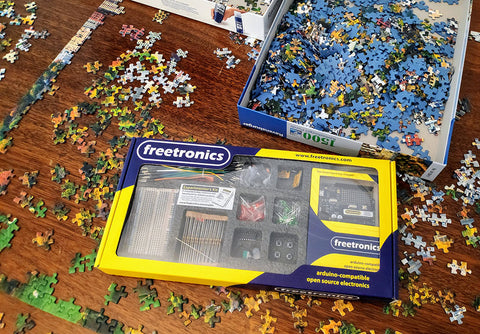
If you've heard about this "Arduino thing" - but not sure how to start - then the best way to learn is with our Experimenter's Kit for Arduino:


The package includes a wide variety of parts, sensors and modules including: a servo motor, lights, buttons, switches, sound, sensors, breadboard, wires and more. Furthermore a Freetronics Eleven Arduino-compatible board is included to make this an extensive hobby experimenter, inventor and starter kit. However we don't leave you alone to figure it all out, included is a great project and instruction booklet, plus access to a supporting web page and software examples. In other words - this is everything you need to get started for a fun range of electronics and Arduino related projects! 

So to get started or for more information and to order, check out the product page.

May 23, 2013

Make a simple 2x2x2 Arduino LED cube

 If you're looking for an inexpensive and fun thing to make with your Arduino or compatible board, check out the small LED cube by Arduino forum member "cordes". It's a good starting point for this type of project as the reduced number of LEDs required reduces the complexity of the sketch - and the required construction. Nevertheless it's a fun example and following through the code gives you a solid idea of how it works. In the following video you can see the project in action:


For the Arduino sketch and more discussion, login to the Arduino forumAnd for more, we're on twitter and Google+, so follow us for news and product updates as well. 

Interested in LED cubes? Coming soon from Freetronics is our new CUBE4: - the 4x4x4 RGB LED cube like no other:


We consider this to be the most versatile, programmable and expandable RGB LED cube kit on the market - and it's coming soon. So stay tuned for the product release announcement!

May 22, 2013

Mind-controlling microbes with an Arduino

 If you've always wanted to control something by just thinking about it, but lack the superpowers necessary to make it happen - then you may fulfil your desires instead by reproducing the following project. Using a hacked EEG sensor from a childrens' game, the signals can be measured by the Arduino which then allows a current to flow in various directions across a field of liquid that contains Paramecia. These tiny microbes response to an electromagnetic field in their water, and will swim towards the anode of that field. And thus the mind control via the EEG and the Arduino. You can see this in action during the following video:


And if you want to do it yourself or just learn more, visit the project page. And for more, we're on twitter and Google+, so follow us for news and product updates as well. 

If you're new to Arduino, the first step is a solid board for your projects - our Freetronics Eleven - the Arduino-Uno compatible with low-profile USB socket, onboard prototyping space and easy to view LEDs:


May 22, 2013

The "Bombatuino" Arduino-powered DJ MIDI controller

 Music enthusiast and student Lukas has created one of the most impressive home-made MIDI controllers we've ever seen, and shared it with the rest of us. Called the "bombatuino" it is designed for software tools such as Traktor Pro, and has an incredibly amount of functionality. Two rotary encoders serve as the main jog wheel controls, and the use of many MCP23017 port expanders and 74HC4051 multiplexers allows the device to have an incredible number of button and potentiometer inputs - all wired back to a single Arduino board. The following video is a quick (and silent) demonstration of interaction with the PC:


Lukas has created a blog that documents the design from his initial thoughts through to the final product, including the requred code and schematics - so check it out. And for more, we're on twitter and Google+, so follow us for news and product updates as well.


When adding your own circuitry for an Arduino-based project such as the DJ controller, you'll need a protoshield to mount the external circuitry. In doing so, consider our range of ProtoShields. From the tiny LeoStick to the Mega range, we offer a complete range for you to work with.


May 22, 2013

Updating wireless garage door controls with Arduino

 After giving 35 years of service the wireless remote system for perhof's garage door needed replacing, and instead of repairnig the old system they instead engineered and built a newer, secure system based on the Arduino platform. The new system uses inexpensive 433 MHz wireless transmitter/receiver sets that are easily available, and even though data only travels in one direction they have created a data protocol that not only keeps the system secure - is also an interesting example in itself. And power management has been taken into consideration, with the transmitter only drawing 0.1 uA when in standby. 


Very well done - for complete details including code and design, visit the perhof website. And for more, we're on twitter and Google+, so follow us for news and product updates as well.

If you're looking to work with your own RF wireless hardware, but don't want to make your own receiver circuit - check out our range of  315/433 MHz receiver shields:


Apart from being idea for working with the various low-cost data links on the market, the shield can also be used to capture wireless weather station data, as described in the book "Practical Arduino". For more information and ideas, check out the product page


May 21, 2013

DIY Remote-control rubber band launcher

 For fun and something different to do, consider this remote-control rubber band launcher by Instructables user "powellcubs". It uses a small servo to create the tension and let the band go, and the system is controlled via infra-red - so you can place it out of the way or in hiding to create some interesting surprises. Reading signals from household infra-red remote controls is quite easy, and the receiver can be found for less than a few dollars. 


That's the base for a whole lot of fun, so click here to get started. And for more, we're on twitter and Google+, so follow us for news and product updates as well.

if you're looking for a small Arduino-compatible board to embed in a project, consider our LeoStick. It's the Arduino Leonardo-compatible board that's cheaper and smaller than the original:


 Apart from being one of the smallest Arduino-compatibles on the market with USB, it also has an onboard RGB LED and piezo which can be used a knock sensor and various tune and sound effects. Plus you can add extra circuitry with the matching protostick! For more information and to order, click here.    

May 21, 2013

DIY Simple "Simon Game" replica

 Those of us born before 1980 may recall the popular electronic game "Simon", that required the use to remember and repeat an ever-increasing sequence of button presses played by the device. It's a fun way to exercise the memory, and can also be easily recreated using an Arduino. Another version of this has been demonstrated by reddit user 'elbow-room' whose sketch is well documented and easy to work with. 


This would also be a great project to build onto a protoshield, so you could just place it on the board and upload he sketch when you get the urge to play the game. The sketch is available here. And for more, we're on twitter and Google+, so follow us for news and product updates as well.

If you've heard about this "Arduino thing" - but not sure how to start - then the best way to learn is with our Experimenter's Kit for Arduino:


The package includes a wide variety of parts, sensors and modules including: a servo motor, lights, buttons, switches, sound, sensors, breadboard, wires and more. Furthermore a Freetronics Eleven Arduino-compatible board is included to make this an extensive hobby experimenter, inventor and starter kit. However we don't leave you alone to figure it all out, included is a great project and instruction booklet, plus access to a supporting web page and software examples. In other words - this is everything you need to get started for a fun range of electronics and Arduino related projects! 

So to get started or for more information and to order, check out the product page.

May 21, 2013

Track your car via GPS, SMS and Arduino

 If you've ever wanted to know where your car, truck, caravan or possibly even your boat is in real-time, then the project described by Instructables user "boraciner" may just solve your problem. They've designed a simple Arduino-based system that uses a GSM modem and a GPS receiver that can send the GPS coordinates via text message when requested by a pre-determined mobile phone. The system is also a good framework for applying more features - such as remote-deactivation or controlling the central locking. 


To find out more, visit the instructions page. And for more, we're on twitter and Google+, so follow us for news and product updates as well. 

If you're new to Arduino, the first step is a solid board for your projects - our Freetronics Eleven - the Arduino-Uno compatible with low-profile USB socket, onboard prototyping space and easy to view LEDs:


May 21, 2013

Hand-made 8x8 LED matrix with Arduino

 Enthusiast Ben Martin has demonstrated his hand-made LED matrix, and explains how it is controlled via Arduino - and in this case with out Freetronics LeoStick board. Controlling the 64 LEDs isn't as hard as first imagined, as using 74HC595 shift registers and ULN2003s can take care of the row and column controls. Although making the matrix yourself may seem like an exercise in tenacious soldering, it's an interesting prototype for wearable electronics projects or embedding in artistic displays:


For more details, visit Ben's interesting website. And for more, we're on twitter and Google+, so follow us for news and product updates as well.

So what's the LeoStick all about? It's the Arduino Leonardo-compatible board that's cheaper and smaller than the original:


 Apart from being one of the smallest Arduino-compatibles on the market with USB, it also has an onboard RGB LED and piezo which can be used a knock sensor and various tune and sound effects. Plus you can add extra circuitry with the matching protostick! For more information and to order, click here.